Step 1: Encounter Builder
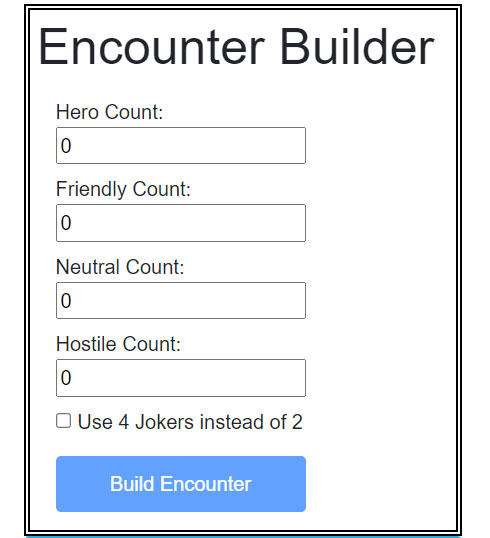
The first step is to specify how many of each Faction you need in your Combat Tracker.
Typically you will have 1 Hero for each Player, and then you'll have a number of other Faction groups based on the situation.
You must specify at least 1 of a Faction before you can build the encounter.
You may also specify adding two additional Jokers to the deck via the checkbox.
Step 2: Tracker Setup
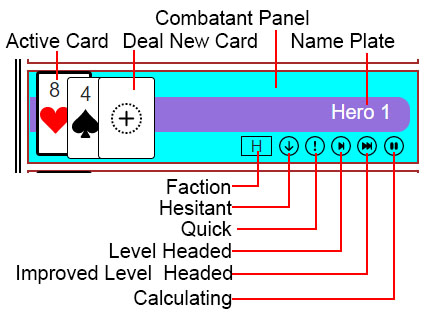
You can modify all aspacts of each Combatant by double-clicking/tapping specific parts of a Combatant Panel.
- Double-click/tap Combatant Panel to set as Active Combatant
- Double-click/tap the Nameplate to change the Combatant's name
- Double-click/tap on a Card to set it as the Active Card
- Double-click/tap an Active Card to go on Hold
- Double-click/tap the Deal Card to add a new Card
- Double-click/tap the Faction box to cycle through Factions
- Double-click/tap to enable/disable Edge/Hindrance options
Cards On Hold
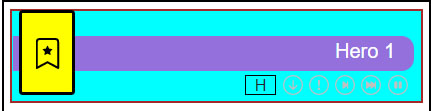
Cards on hold will be designated with a yellow background color.
The card will be replaced with a special "On Hold" card at the start of the next round.
To come off hold just double-click/tap the card.
Step 3: Running the Tracker
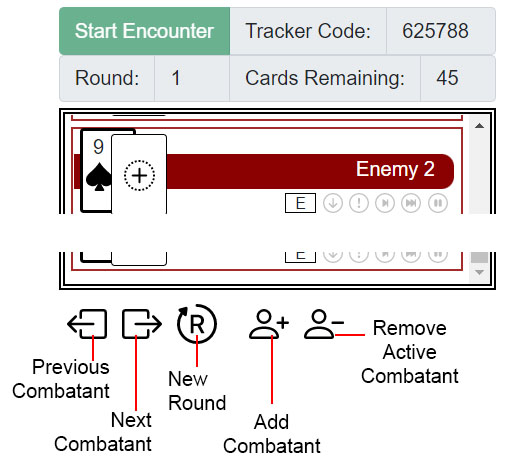
Once the Combatants are set up, you can give your players the Tracker Code so they can connect to your Tracker.
Once everyone is connected, click the Start Encounter button and the first round will be dealt!
If a player connects after the Encounter has started, they can click the Refresh button on their Tracker to get the latest information.
At the bottom of the Tracker are buttons to move to the Next/Previous Combatant, start the Next Round, Add New Combatant, and Remove Active Combatant.
When you need to run a new Encounter, click on the top banner then click Start a New Combat Tracker and repeat!
Start a New Combat Tracker